Chrome Extensions (Part-1)
Browsers have become one the most used applications in the modern OS. A significant portion of tech both consumers and developers interact with is done through web browsers. There are nearly 10 SaaS' for one job, made possible by easily accessible LLMs. However, browsers can do more than just interact with webpages, extensions enable us to build automation, productivity tools, privacy with VPNs, Add custom themes to the browser and more within the browser.
A significant portion of personal computing tech both consumers and developers interact with is done through web browsers.
With the jabbering out of the way,
Let's build a chrome extension that enhances the UX of search and sort functionality on Reddit. Reddit has sort functionality in multiple pages
- Custom Feeds - can be sorted by Top, Hot, New etc.
- Search - has sort functionality & filter by date, type (post, communities etc)
- Reddit homepage - same as custom feed.
However, When you revisit your custom feed or search a different keyword. Reddit doesn't presist the previous sort/filter state.
So, given the above problem statement, we will build a simple extension that saves a user's set filter/sort states in the browser and applies these saved filters whenever user returns to respective pages on reddit. We will also enable the user to change and apply these values from within the extension popup itself.
Where does an extension live?
A browser identifies any directory that has a manifest.json file as an extension directory. To load this extension into your chrome
browser, navigate to chrome://extensions enable Developer Mode and click Load Unpacked button to load the Extension directory
Starting with manifest.json to define our extensions entry points, permissions, browser api requirements etc
{
    // Required properties
    "manifest_version": 3,
    "version": "1.0",
    "name": "My Reddit Extension",
    // Required by chrome webstore
    "icons": {
        "16": "icons/16.png"
    },
    "description" : "Reddit filtering enhancement",
    // Optional
    "action": {
        "default_popup": "index.html",
    },
    "content_scripts": {
        "js": {}
    }
}
action- It defines the Popup dialog html, extension icons etc,
content_scripts- scripts that interact with the webpage
Any javascript that is required to interact with the action's html can be included in it with a <script> tag. However this doesn't have access to
the open webpage's html as it runs in the extension's context rather than the page's. Let's discuss that next.
Execution contexts
In an extension, JS may execute in different contexts residing in script or html files(ex. options page). Even though they are in the same directory,
the browser doesn't allow direct access to objects across these scripts as they may be declared in different contexts in the manifest.json.
The different contexts are as follows
- Extension context (popup)
- Content scripts
- Options page
- Service workers
The Extension context
It handles the layout and interactivity for the extension dialog box, it can be used for managing extension settings, displaying information etc.
-
It's HTML DOM can be defined in the
action.default_popupproperty ofmanifest.json -
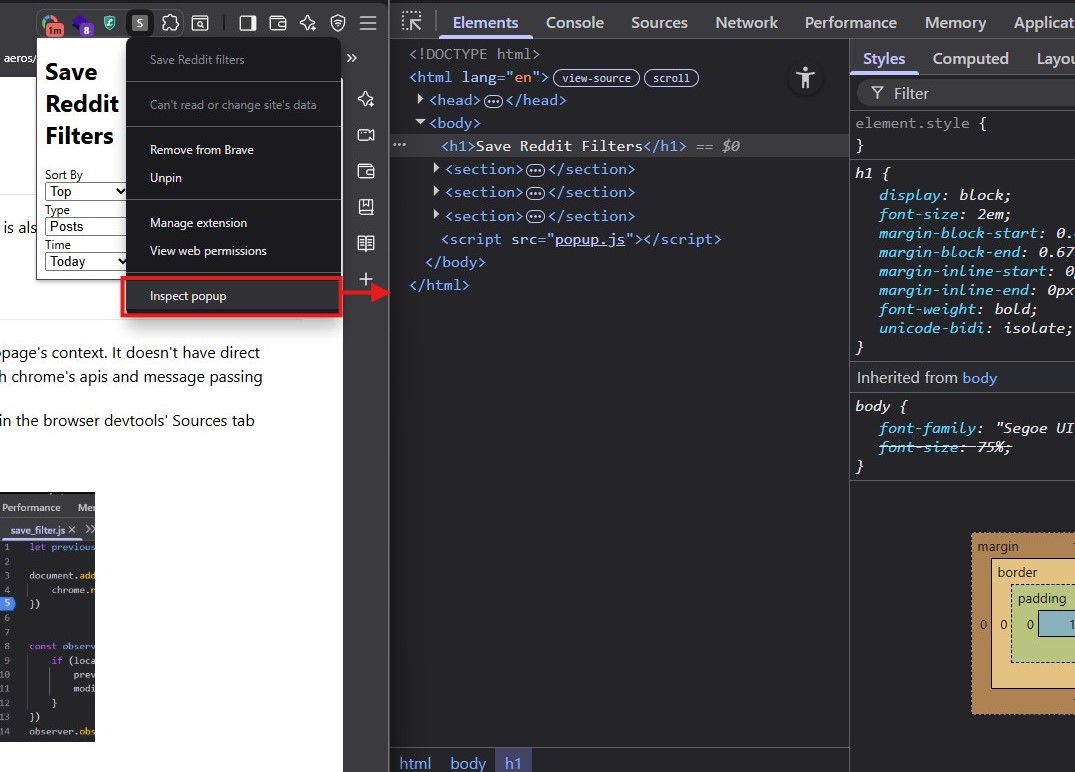
The js executing in this context has its own developer tools and can be accessed by right-clicking the extension icon
Content Scripts
This is js that can be injected into a page and runs in the browser webpage's context.
-
It doesn't have direct access to the Extension's context but can communicate with it through chrome's apis and message passing
-
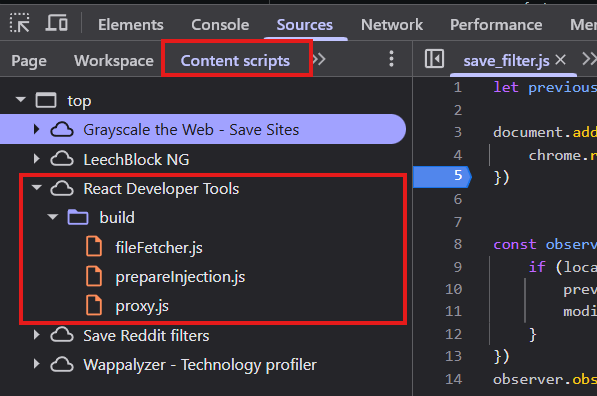
For debugging purposes, any content_scripts you write can be found in the browser devtools' Sources tab
Options page
The options page is an HTML document which can be accessed by the url chrome-extension://<extension-id>
- it is mainly used to show and store user preferences for the extension behavior.
- it can be defined in the
manifest.jsonas
{
    ...,
    "options_page": "options.html"
    ...,
}
Service workers
An extension service worker is the context that runs in the background, responds to events, is short lived and can be restarted.
- Writing a service worker for your extension requires it to add related entries into
manifest.json. - The key needed is
background.service_worker
{
    ...,
    "background": {
        "service_worker": "<worker_name>.js"
    }
}
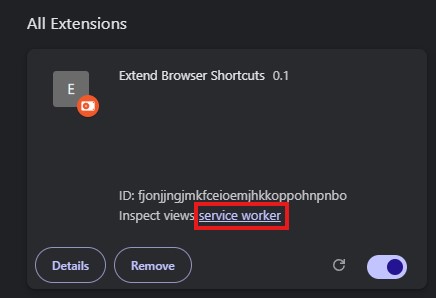
Since a service worker is a separate context itself. We access its debugger from the browser's <browser_name>://extensions page
Message passing
The mechanism to communicate across the different contexts is defined in extension development as Message passing, so that required contexts aren't fully isolated. Messages can either be one time or long running connections.
The following web extension APIs can be used to perform message passing
One time messaging
chrome.runtime.sendMessagechrome.tabs.sendMessage- listen via
chrome.runtime.onMessage
Long lived connections
Long lived connections are created using runtime.connect({name: ""}) or tabs.connect()
which returns a (Port)[] object with the specified name.
This port object can then be used to send messages with .postMessage() & receieve messages with
.onMessage.addListener((msg) => {})
To listen for messages on an active port within a context other than the Port's local context, we need to use the
chrome.runtime.onConnect.addListener((port) => {}) method.
Other possibilities with message passing include -
- for communication across extensions in a browser, the APIs to use are:
chrome.runtime.onMessageExternalfor one-time messageschrome.runtime.onConnectExternalfor long-livedPortbased connections
runtime.sendMessageandruntime.connectAPIs are used to send messages across extensions by passing the optional parameterextensionId?to these APIs- communication from a webpage to an extension
- edit
manifest.jsonto- list domains that the extension will allow receiving messages from in the
externally_connectablekey.
"externally_connectable": { "matches": ["https://example.com"] }- the same cross-extrension APIs above can be used to handle this webpage to extension messaging as well.
- list domains that the extension will allow receiving messages from in the
- edit
In the next article, we will augment the behavior of reddit filter and sort options in its search and custom feed pages. Currently reddit doesn't save these preferences, our extension will save user's preferred options for these fields